( iconStiX 3.5.1 )
 Loading...


Descriptions for Description
Name: iconStiX
Version: 3.5.1
Release Date: September 25, 2016
Language: English
Developer: Trollin
MAS Rating: 4+
Mac Platform: Intel
OS Version: OS X 10.10 or later
Processor type(s) & speed: 64-bit processor


Web Site: http://trollin.loos.li/iconStiX/
Mac App Store: https://itunes.apple.com/app/iconstix/id412598996?mt=12


Overview:
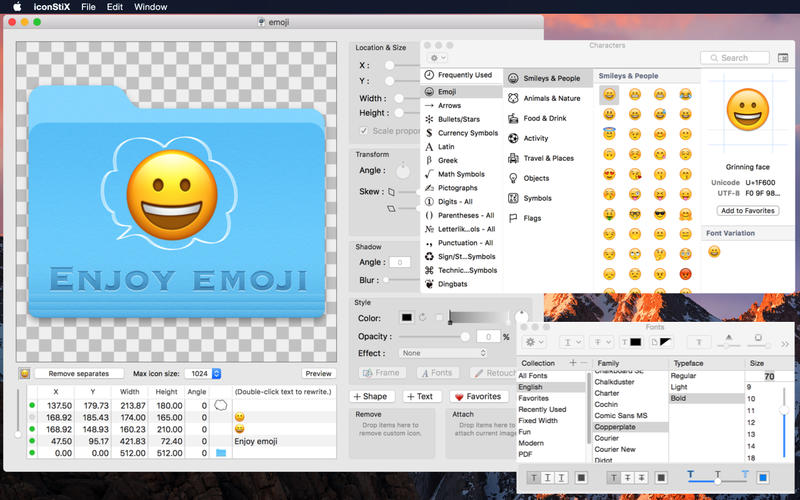
iconStiX is a custom icon tool: combine images, add text, edit styles and attach your composition to desktop items (such as folder) or save as image.
More details: You can
- add and reorder multiple objects (image, shape and text).
- move, resize, rotate, skew, color, add shadow and effects (recess, shine, sketch).
- modify fonts and adjust text style.
- use your image as texture (e.g. cover a folder with a photo).
- erase or paint over image objects (retouch function).
- add small icon images separately for better visibility in the list view.
- limit the max icon size (512, 256 or 128) instead of the full size (1024).
- preview in different sizes (manual scaling or animation).
- keep favorite images for quick access.
- save your settings as documents (QuickLook compatible).
- export composition as images (icns, png, tiff).
- attach/remove custom icons via drop boxes or the Finder services.
Note: read/write permission is required to change custom icons.


What's New in Version 3.5.1:
· Objects can be locked in addition to be active or hidden. Click a circle of the relevant object in the objects table to change its state: [green] active (editable), [yellow] locked (not selectable but visible), [gray] hidden (neither selectable nor visible).
· Bug fixing and internal adjustments for macOS 10.12.
Screenshots