( BlueHarvest 8.5 )
 Loading...
BlueHarvest 8.5 for Mac
BlueHarvest is a background utility from Ross Tulloch (zeroonetwenty) that keeps non-Mac disks clean of macOS metadata. When you copy to a USB stick, SD card, NAS share, or client deliverable, Finder often leaves behind .DS_Store files, ._ AppleDouble sidecars, and related folders—BlueHarvest removes them as they appear or on demand.
Who needs it
- Video editors handing ProRes or project folders to Windows suites
- Developers and IT staff maintaining cross-platform file servers
- Anyone tired of explaining “hidden Mac files” on shared drives
- Users who zip folders for Windows recipients and want metadata stripped from the archive
How it runs
After setup, BlueHarvest watches configured volumes and deletes targeted items automatically—set-and-forget style. For a one-off cleanup, Control-click a disk or folder in Finder and choose Clean using BlueHarvest. The Clean and Eject workflow cleans metadata and ejects removable media; version 8.4 improved reliability of that path.
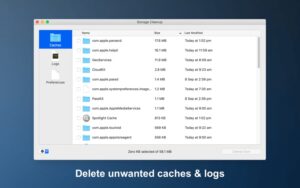
From version 8 onward, Storage Cleanup also targets app caches and log files on your Mac to reclaim local space—a separate concern from external-disk metadata, but bundled in the same app.
What gets removed
- .DS_Store and ._ AppleDouble resource forks
- .AppleDouble, .Trashes, .Spotlight, .fseventsd, .TemporaryItems, and related items (per your preferences)
- Optional __MACOSX folders in zip workflows (off by default in recent builds)
- System Volume Information folders on Windows-oriented volumes (8.4+)
On macOS 10.14 Mojave and later, grant Full Disk Access in System Settings if you want .Spotlight and .Trashes folders removed—documented on the vendor site.
Version 8.5
Released 1 June 2026: support for disks mounted under the user Application Support folder, and a prompt to request a new free serial when old version 6 keys are used on Apple Silicon Macs. Requires macOS 10.15.4 or later; universal Intel and Apple Silicon builds. About $14.95 for a single-user license after a 30-day trial.