( Cisdem AppCrypt 7.10.0 )
 Loading...
Cisdem AppCrypt
A macOS utility that password-protects selected applications and blocks websites in major browsers, aimed at parents, shared Macs, offices, and anyone who wants friction between impulse and distraction.
Typical Mac workflow
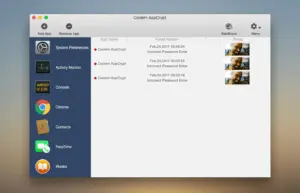
You add apps to the lock list or switch to Allowlist mode so every application is blocked except approved ones. When someone opens a locked app, AppCrypt prompts for your password; failed attempts are logged with time and date, and the Mac edition can optionally capture a photo of the intruder. Auto-lock re-secures apps after inactivity, when you step away, or when the Mac sleeps—a behavior reinforced in recent 7.9.x builds that lock all managed apps on sleep.
Web Block runs alongside App Lock. You can block specific domains or pages, filter URLs by keyword, restrict categories such as Social or Gambling, import custom lists, or block adult sites in one click. Always Block and Always Allow lists keep certain sites permanently restricted or exempt from schedules. General schedules apply to all locked apps and blocked sites; custom schedules override them for individual entries, which suits bedtime or work-hour rules that span midnight.
Browsers, bypass protection, and licensing
On Mac, website blocking works in Chrome, Safari, Edge, Opera, Brave, Arc, Dia, and Ecosia, including incognito sessions per the vendor. AppCrypt requires a password to change settings, quit, or uninstall, and can launch at login so restrictions survive reboots. A 3-day trial unlocks all features; paid licenses are $19.99 per year or $39.99 lifetime for one Mac. Version 7.10.0, released 2 July 2026, adds the three newer browsers above, declares full Apple Silicon support, and includes bug fixes and performance improvements. macOS 10.12 Sierra or later is listed in vendor documentation.