( ForkLift 4.6.4 )
 Loading...
What ForkLift does on Mac
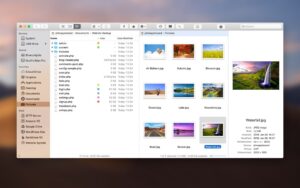
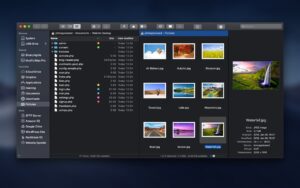
ForkLift 4 is a dual-pane file manager and transfer client for macOS from BinaryNights that combines Finder-style browsing with FTP, SFTP, cloud drives, and folder synchronization in one native app.
ForkLift targets Mac users who outgrow Finder for daily file work: developers moving code to servers, designers syncing asset folders, and admins managing S3 buckets or NAS shares. Two side-by-side panes let you drag files between local disks and remote volumes, queue transfers, and compare folders before syncing.
Connection and transfer options
- Local volumes, iCloud, and network shares via SMB, AFP, and NFS
- SFTP, FTP, and WebDAV servers
- Amazon S3, Backblaze B2, Google Drive, OneDrive, Dropbox, and Rackspace Cloud Files
- Transfer queues with bandwidth limits, conflict rules, and reorderable jobs
- Remote file editing with automatic upload when you save in your preferred editor
File management tools
- Folder sync with one- or two-way rules and saved favorites
- Search and filter by name, extension, kind, tags, or content on local and remote paths
- Quick Select to build selections by typing filenames, extensions, or tags
- Batch rename presets and archive handling for zip and other formats
- Preview panel for images, PDFs, audio, video, and in-place text editing
- Git integration, checksum tools, and comparison with external diff apps
Typical Mac workflow
Connect a production SFTP site in one pane and keep your local project in the other, then drag changed files across and let ForkLift queue uploads. Use Sync favorites to mirror a Dropbox or S3 folder on a schedule. Tag autocompletion from version 4.6 speeds metadata work; custom toolbar tools from Settings give one-click access to shell scripts you define.
Version 4.6.4
Build 4.6.4, released June 16, 2026, is a usability-focused patch. Quick Select now matches accented characters in filenames, and Go to Folder resolves aliases and symlinks. Settings warn before theme deletion, Column View rename scrolling is fixed, and Sync is disabled while a pane is in search mode to avoid conflicting operations.
Licensing and requirements
ForkLift 4.4 and later require macOS 14.6 Sonoma or newer according to BinaryNights support; Tahoe compatibility is documented from 4.3.4 onward. Licenses are lifetime purchases with one or two years of included updates (about $19.95 for a single user); after the update period you keep the last licensed version indefinitely. ForkLift is also available through Setapp. A free trial is offered on the vendor site.