( SwiftServer – Monitoring & SSH 2.0.5 )
 Loading...
SwiftServer — Monitoring & SSH
A native Apple-platform client for watching Linux server health, opening SSH sessions, and moving files over SFTP without installing a monitoring agent on the remote machine.
Typical Mac workflow
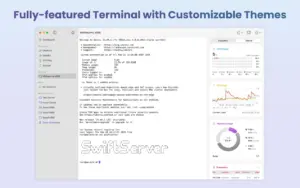
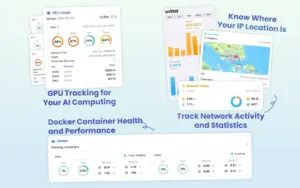
You add servers with SSH credentials or keys, then open a dashboard that polls standard Linux commands for CPU load, memory, disk partitions, network throughput, Docker containers, and optional NVIDIA GPU stats. When a metric looks wrong, the same app opens a full terminal tab or an SFTP browser so you can inspect logs, restart services, or edit a config file. Server groups, tags, and a global map view help when you manage more than a handful of hosts. On Mac, version 2.0 also introduced widgets and Live Activities so you can glance at status from the desktop or lock screen without keeping the main window open.
Monitoring without server-side software
According to the vendor, SwiftServer does not install its own daemon on Linux. Metrics come from commands run over your existing SSH connection, which keeps the remote system clean but means monitoring quality depends on what the OS exposes (Docker version, vnstat availability, GPU drivers, and similar). That trade-off suits VPS and bare-metal boxes where you already have shell access and prefer not to add another package just for charts.
SSH, jump hosts, and file transfer
The 2.0 line replaced the SSH stack with an engine aimed at more stable sessions, jump-server support for bastion setups, and server-to-server SFTP transfers. Terminal appearance can be customized on Premium plans; free tier still covers core monitoring, terminal control, snippets, and basic SFTP. Jump-server routing matters for teams that never expose SSH directly to the internet.
Licensing and platform requirements
The app is free to download with optional Premium subscriptions or a lifetime unlock for unlimited server entries, iCloud sync across iPhone, iPad, and Mac, public IP geolocation on the dashboard, and deeper terminal and SFTP editing features. Mac installs require macOS 15.0 or later alongside iOS 18 on mobile siblings in the same universal purchase. Version 2.0.5 is a small maintenance update on the App Store; the vendor’s web changelog currently lists through 2.0.1, so patch details for 2.0.5 come from store release notes rather than the documentation site.