( Noir – Dark Mode for Safari 2026 1.6 )
 Loading...
Noir on Mac Safari
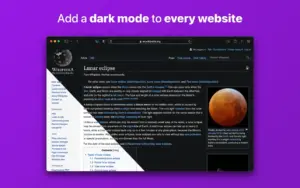
Noir is a Safari extension that adds a readable dark theme to websites that only ship a bright layout, so late-night browsing does not flash white pages in your face.
Who it is for
Noir suits anyone who keeps Safari in dark appearance but still hits blinding news sites, docs, forums, or admin panels. It is also useful when a site has a dark mode that looks worse than a tuned third-party theme, or when you want dark styling on just a few domains instead of every tab.
First-time setup
- Install the Noir Mac app from the App Store and open it once.
- Enable the Noir extension in Safari → Settings → Extensions.
- Choose whether Noir follows system Dark Mode or stays on/off globally.
- Optionally pick a default theme from the built-in library or create your own.
After that Noir runs on every Safari page load without a manual toggle per visit.
What happens on each page
While a site loads, Noir reads the page colors and structure, then applies a custom dark stylesheet matched to that layout. Contrast and highlights are preserved where possible. If the site already exposes a built-in dark mode, Noir can detect it and step aside unless you override that behavior for the domain.
Everyday controls
- Global modes: Auto (follow macOS), On, Off, or Default per your preference.
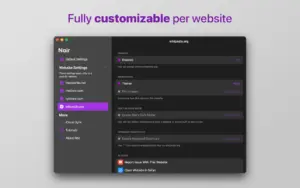
- Per-website rules: force Noir on, force it off, or pause until tomorrow from the Safari toolbar menu.
- 20+ preset themes plus custom colors via the system color picker.
- Shortcuts, Focus filters, and keyboard shortcuts for power users who switch contexts often.
- iCloud sync of settings across Mac, iPhone, and iPad if you use Noir on multiple devices.
Advanced options (2026 line)
Enable Advanced Settings in the companion app to unlock per-site fine tuning from the Safari menu:
- Disable dynamic color shifts on stubborn pages.
- Hide background images when they break readability.
- Turn off image inversion where photos should stay natural.
- Report incorrectly detected native dark modes to help future compatibility updates.
Privacy and licensing
The extension needs access to pages you visit so it can analyze and restyle them. The developer states Noir does not collect browsing data; settings stay on your device and in your iCloud account. Noir is a one-time App Store purchase with Family Sharing, not a subscription.
Version 2026.1.6
Build 2026.1.6 is a compatibility-focused update with another batch of website fixes and improvements driven by user reports. It requires macOS 12.0 or later. If a page still looks wrong, use the in-app report flow so the developer can target it in a future release.