( Session Pomodoro Focus Timer 2.13.47 )
 Loading...
Session
A Pomodoro-style focus timer from Translucent LLC for Mac, iPhone, iPad, and Apple Vision that structures work into timed sessions, enforces breaks, and tracks what you worked on—aimed at freelancers, students, and knowledge workers who lose focus to notifications and open tabs.
Typical Mac workflow
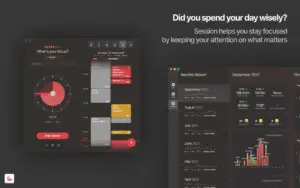
You state an intention, rotate the timer dial to start a focus block (often 25 or 45 minutes), and work until Session enters overflow or a scheduled break. On Mac, the app can block chosen websites in Safari, Chrome, Brave, and Edge and block distracting apps while a session runs, then restore access when you rest. Slack teams can mute automatically during focus and reopen afterward.
After each session, Session may ask what you learned and logs duration, category, and notes for daily review. One-way Apple Calendar sync creates session entries so you can see how the day progressed. Shortcuts, AppleScript, Do Not Disturb automation, widgets, Live Activities, and cross-device sync let you start on Mac and continue on iPhone or Apple Watch. The 2.13 line added Apple Reminders in the calendar view and an early To Do preview with Things 3 and Linear integrations.
Licensing and version 2.13.47
Session is free to download with Pro at about $4.99 per month or $39.99 per year via the Mac App Store; a direct Mac download is also available from stayinsession.com. Version 2.13.47, released 3 July 2026, fixes a Pro-subscription crash on iOS and iPadOS and addresses early To Do preview bugs around session titles and state. Requires macOS 10.15 or later for the Mac build.